Make music / LIVE
Live mode
Launch and stop channels at predictable musical boundaries while the shared performance clock keeps running.
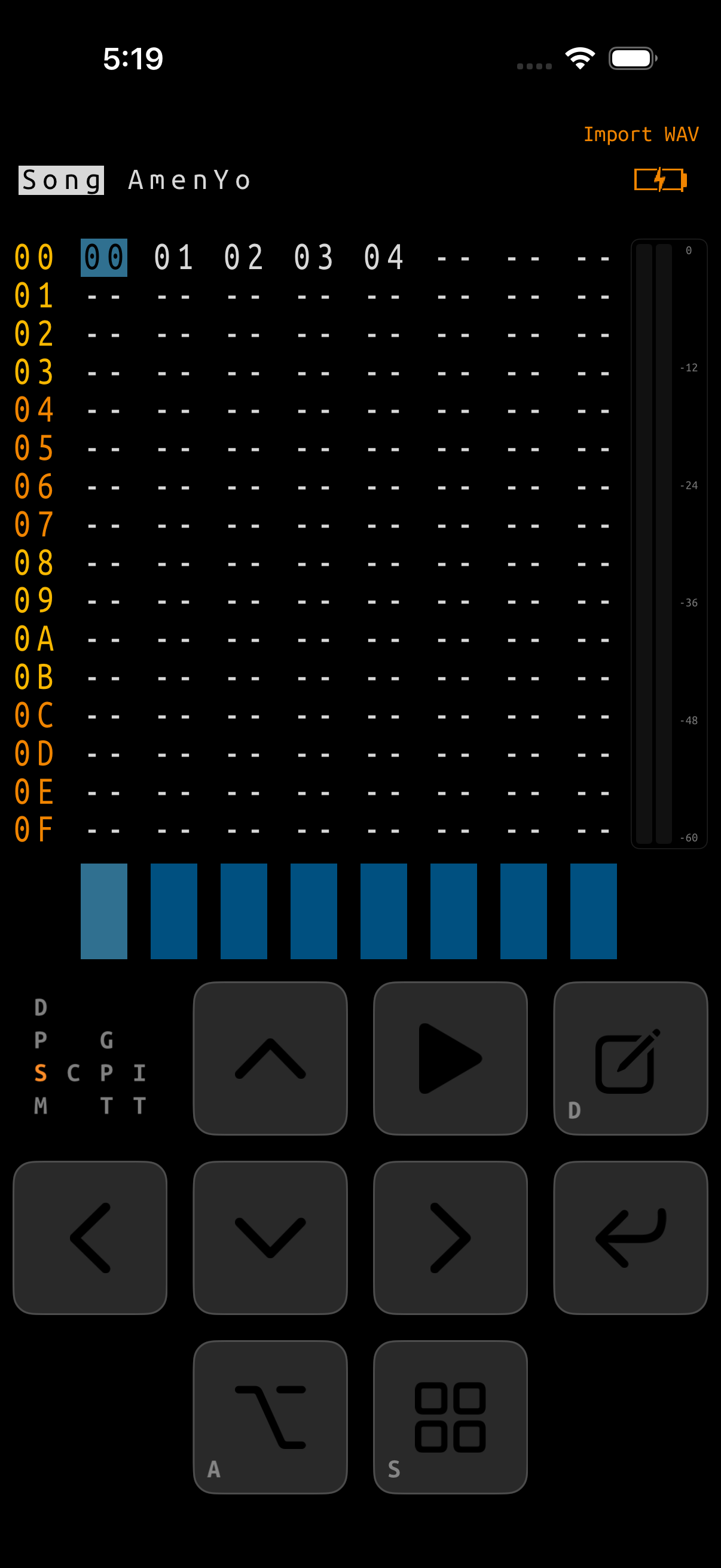
What Live mode controls
Live mode separates the transport clock from the material playing on each Song channel. The clock can continue while individual channels start, change chains, or stop. This keeps every launch aligned and lets a silent performance resume without restarting the transport.
Three pieces of state are visible during a performance:
| State | What it means |
|---|---|
| SONG / LIVE title | The selected performance mode. Chain and Phrase show an always-visible LIVE badge while Live mode is selected. |
| Transport | Whether the shared clock is stopped or running. A local channel stop does not stop this clock. |
| Queue marker | A captured start or stop waiting for a chain or phrase boundary. |
GlassTracker captures the channel, Song row, Chain step, phrase, and transpose when you issue a launch. You may move the cursor or change screens afterward; the original target still executes.
Enter and leave Live mode
Mode commands are available on the Song screen and are absolute:
- EDIT+RIGHT selects LIVE.
- EDIT+LEFT selects SONG.
Holding or repeating either chord keeps the requested mode; it does not toggle back and forth. A grid selection does not block the mode command. The on-screen pad, hardware-keyboard aliases, and Remote Control use the same command policy. Leaving LIVE cancels every pending launch and removes its markers before ordinary Song playback can resume.
Chain and phrase boundaries
A running Live performance normally queues a request instead of changing audio immediately:
- The first press uses the channel’s next chain boundary: the current chain completes before the request executes.
- Repeat the same pending command to promote it to the next phrase boundary: the current phrase completes, then the request executes sooner.
- A third or later identical press stays at phrase priority. It never falls back to the slower chain boundary.
- Choosing another row replaces the pending launch with the newly captured target. A start can replace a stop, and a stop can replace a start.
When Live is stopped, a playable launch starts immediately and also starts the shared clock. A stop request against an idle channel does nothing.
Song commands
The Song grid is the main performance view. The focused column identifies a channel and the focused row identifies the chain to launch on it.
| State | Command | Result |
|---|---|---|
| LIVE, stopped | PLAY | Start the focused playable channel and row immediately; start the Live clock. |
| LIVE, stopped | ALT+PLAY | Start every playable channel on the focused row immediately; start the Live clock. |
| LIVE, stopped | NAV+PLAY | Do nothing. A stop command cannot accidentally start Live. |
| LIVE, running | PLAY | Queue the focused channel and row to start at its next chain boundary. |
| LIVE, running | same PLAY again | Promote that launch to the next phrase boundary. |
| LIVE, running | ALT+PLAY | Queue every playable channel on the focused row at a chain boundary. |
| LIVE, running | same ALT+PLAY again | Promote every matching launch to a phrase boundary. |
| LIVE, running | NAV+PLAY | Queue the focused playing channel to stop at its next chain boundary. |
| LIVE, running | same NAV+PLAY again | Promote that local stop to the next phrase boundary. |
Selections and empty cells
With a horizontal Song selection, plain PLAY and NAV+PLAY apply to its selected channels at the focused row. ALT+PLAY always means all eight channels, even while a smaller selection is visible. Empty -- cells are ignored and remain silent.
The Song-mode ALT+PLAY shortcut
You do not have to change the visible title to make a one-shot all-channel launch. In SONG mode, ALT+PLAY performs the current row’s all-channel Live launch while the title remains SONG. From stopped it launches immediately. During ordinary Song playback it installs an executable Live queue for the next boundary; repeating the same pending request promotes it to the phrase boundary. The request cannot remain hidden and fire during a later session.
Ordinary SONG-mode PLAY still starts the arrangement when stopped and stops it globally when running.
Launch from Chain and Phrase
Chain and Phrase let you launch a more exact target without returning to Song. Both retain the Song channel and occurrence from which they were opened.
| Screen | LIVE stopped: PLAY | LIVE running: PLAY |
|---|---|---|
| Chain | Start the highlighted phrase/transpose step immediately on its Song channel. | Queue that exact highlighted step at the channel’s next chain boundary; repeat to promote it to a phrase boundary. |
| Phrase | Start the edited Chain occurrence from phrase row 00. | Queue that exact Chain occurrence to restart from phrase row 00; repeat to promote it. |
On Chain and Phrase, NAV+PLAY keeps its contextual play in song meaning. It starts or toggles the containing Song context; it is not the channel-local queued stop used by the Song screen. To stop one Live channel at a boundary, return to Song and use NAV+PLAY there.
Read the display
| Marker | Blink | Pending action |
|---|---|---|
> | Slow | Start at the next chain boundary. |
> | Fast | Start at the next phrase boundary. |
_ | Slow | Stop the channel at the next chain boundary. |
_ | Fast | Stop the channel at the next phrase boundary. |
The marker is drawn at the captured Song row, Chain step, or exact Phrase occurrence. A muted channel with a queued start still shows >; mute state and launch intent are separate. The marker disappears as soon as the request executes or is cancelled.
Local stop versus global Stop
A queued Song NAV+PLAY is a local stop. It silences only the targeted channel at the chosen boundary. Even after every channel is locally stopped, the Live clock keeps running so another launch can join it in time.
A global Stop stops the transport clock from advancing and clears every queue. The final elapsed-time value remains visible; Stop does not reset that readout to zero. Use ordinary PLAY on a disconnected native page while transport is running, an external MIDI Stop, a synchronized Link Stop, or Remote Control’s STOP ALL SOUND. Project changes, engine teardown, and output-route removal also clear Live queues so an old request cannot reappear later.
Record and Live mode
EDIT+PLAY opens Record from Song, Chain, or Phrase in both SONG and LIVE modes. It is not a Live retrigger command. Record normally requires stopped transport; Device → ADVANCED RECORDING retains its documented ability to open Record while playback continues.
A short performance walkthrough
- On Song, press EDIT+RIGHT and confirm the title says Live.
- Focus a populated cell and tap PLAY. That channel starts immediately and establishes the Live clock.
- Focus a different populated row on that channel and tap PLAY. A slow
>queues the change at the chain boundary. - Tap PLAY again before it fires. The faster
>moves the change to the phrase boundary. - Use ALT+PLAY on a prepared row to bring in all populated channels together.
- Focus one playing channel and press NAV+PLAY once or twice to choose a chain- or phrase-boundary stop.
- Launch that silent channel again; it rejoins the clock. When finished, use a global Stop or press EDIT+LEFT to leave Live and cancel pending requests.
If Live does something unexpected
| Symptom | Check |
|---|---|
| A launch has not happened yet | Look at blink speed. Slow waits for the chain end; repeat the same request for a faster phrase-boundary launch. |
| NAV+PLAY did not stop on Chain or Phrase | That chord is contextual play-in-song on those screens. Use it on Song for a local channel stop. |
| The channel stopped but PLAY still looks active | A local stop leaves the Live clock running by design. Use global Stop to end the transport. |
| A queued target differs from the cursor | The marker and launch retain the target captured when the command was pressed. Issue a new request to replace it. |
| A row launches fewer than eight channels | ALT+PLAY ignores empty -- cells. Confirm each intended channel contains a chain on that row. |
| A marker disappeared | The request executed or was cancelled by mode exit, global Stop, a project lifecycle event, or route removal. |